After returning from a well deserved (as I may say so :-) vacation in The United States I found an article on the Internet about Sharepoint Portal Server usage analysis.
Analysis by using the IIS logs does not work and the Usage Analysis UI is only provided in WSS. This aricle describe the why and how to work around these issues:
Your Top 10 List...Or How To Gather Usage Statistics with SharePoint
Monday, August 07, 2006

Tuesday, July 11, 2006
Lots of Microsoft Office Sharepoint Server 2007 info!!
Here are some links to information about Microsoft Office Sharepoint Server 2007:
- Microsoft Office Preview
- Microsoft Office Beta Online
- IT Content for 2007 Office System Beta 2 (required for Office Beta pages) (AuthInstall.msi)
- Deploy Office SharePoint Server 2007 (Beta 2) on a single server
- Deploy Office SharePoint Server 2007 (Beta 2) in a server farm environment
- Using SQL Server 2005 for MOSS2007
- Installing a New Microsoft Office SharePoint Server 2007 Portal: Step-by-Step Instructions
- Deploy Language Packs in Office SharePoint Server 2007
- Introduction to Excel Services and Excel Web Access
- 2007 Microsoft Office Servers Beta Known Issues/ReadMe
- Microsoft Windows SharePoint Services (version 3) Beta Known Issues/ReadMe
- Site with lots of MOSS2007 links
Friday, June 30, 2006
Performance Issues Delay Office 2007
"by Stuart J. JohnstonJune 29, 2006"
Microsoft acknowledged Thursday that it has, at least slightly, delayed delivery of Office 2007, primarily for performance issues.
"Based on internal testing and Beta 2 feedback around product performance, we are revising our development schedule to deliver the 2007 Microsoft Office system by the end of year 2006, with broad general availability in early 2007," said a statement provided by a Microsoft spokeswoman.
Microsoft acknowledged Thursday that it has, at least slightly, delayed delivery of Office 2007, primarily for performance issues.
"Based on internal testing and Beta 2 feedback around product performance, we are revising our development schedule to deliver the 2007 Microsoft Office system by the end of year 2006, with broad general availability in early 2007," said a statement provided by a Microsoft spokeswoman.
Beta 2 of Office 2007 just started in late May when it was given out to attendees at Microsoft's annual Windows Hardware Engineering Conference in Seattle.
No one knows at this point, exactly how much extra time will be needed to assure the gigantic product is fully tested and optimized, and the company declined to speculate, saying, as always, that quality will determine schedules and not vice versa.
"Feedback on quality and performance will ultimately determine the exact dates," the statement said
Thursday, June 08, 2006
Sharepoint, databases and transaction logs
Recently I some servers of a customer experienced some SQL errors. The SQL transaction logs filled up really quickly, filling up the disk and causing Sharepoint to stop functioning. On the blog of Bill English I found a really usefull article about Sharepoint, databases, transaction logs and recovery models: SQL Databases, the LDF files and Sharepoint Portal Server backups
Tuesday, May 30, 2006
Microsoft Office Sharepoint Server 2007 Beta 2 has been released!!
Last tuesday (May 23th 2006) Microsoft released the Beta 2 version of the upcoming Microsoft Office Sharepoint Server 2007. This Beta is publicly available and can be downloaded at Office Preview
Besides MOSS2007 Beta 2, Microsoft also release Windows Vista Beta 2 for everyone who is a MSDN subscriber. More info can be found at http://www.microsoft.com/windowsvista/
Besides MOSS2007 Beta 2, Microsoft also release Windows Vista Beta 2 for everyone who is a MSDN subscriber. More info can be found at http://www.microsoft.com/windowsvista/
Tuesday, May 23, 2006
How to hide the Quick Launch bar very easily
On his blog, Todd Bleeker shows a very easy way to hide the Quick Launch bar:
- Just add a Content Editor Webpart to your page
- Add the following text in the Source Editor:
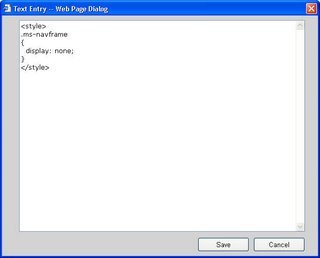
- Click Ok and voila, you are done! The Quick Launch bar is now hidden.
- To get it back, just delete the Content Editor webpart you have just created.
Source: Blog Todd Bleeker
- Just add a Content Editor Webpart to your page
- Add the following text in the Source Editor:
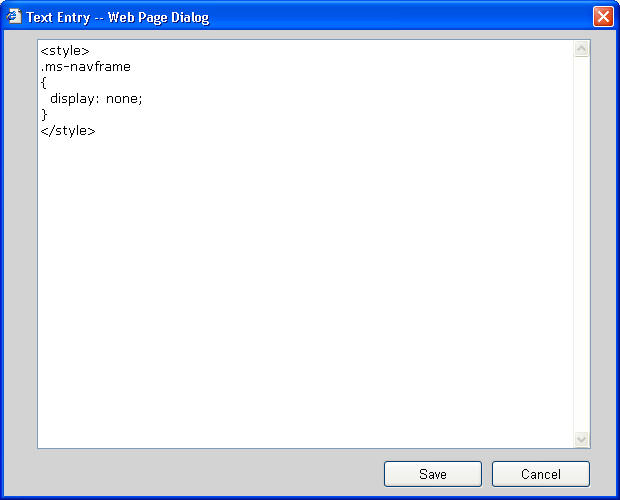
- Click Ok and voila, you are done! The Quick Launch bar is now hidden.
- To get it back, just delete the Content Editor webpart you have just created.
Source: Blog Todd Bleeker
Tuesday, May 16, 2006
Article about the appearance of Bill Gates at the Sharepoint Conference 2006
CNN has published an article about the presentation of Bill Gates at the Sharepoint Conference 2006 yesterday:
http://www.crn.com/sections/breakingnews/dailyarchives.jhtml?articleId=187203303
http://www.crn.com/sections/breakingnews/dailyarchives.jhtml?articleId=187203303
Monday, May 15, 2006
Live from the Sharepoint Conference 2006
Here is another post, but this time not from The Netherlands. Right now I am in the keynote/opening session of the Sharepoint Conference 2006 in Bellevue, Washington USA. In about 10 minutes Bill Gates is going to open the conference.
Over the next few days I am hoping to hear a lot about the upcoming Sharepoint 2007 (MOSS 2007) product. Of course, every cool thing I hear will be posted here!!
CU and happy Sharepointing!!
Yorick
Over the next few days I am hoping to hear a lot about the upcoming Sharepoint 2007 (MOSS 2007) product. Of course, every cool thing I hear will be posted here!!
CU and happy Sharepointing!!
Yorick
Friday, April 21, 2006
"We need to figure this out".......Huh?!?!?
On his blog, Victor Vogelpoel is showing something he found in the code of the Dataviewer Webpart. Looks like the programmers did not know what to do with it: We need to figure this out :-)
Wednesday, April 19, 2006
Usefull tool: iFilter Explorer
A colleague of mine pointed me to a tool called iFilter Explorer. With this tool you can view which iFilters are installed on a machine and which products are able to use them (Sharepoint, SQL, Desktop search, etc). Very usefull!!
This tool can be found at: http://citeknet.com/
This tool can be found at: http://citeknet.com/
Subscribe to:
Posts (Atom)