The default top navigation menu shows the mavigation structure in two levels, the first level are tabs and the second level is a dropdown menu.
It is possible to change the maximum depth of these menus. To change this default setting, do the following:
The setting can be changed by changing MaximumDynamicDisplayLevels iten in the SharePoint:AspMenu tag of the master page.
- Open the default.master page at [drive]:\Program Files\Common Files\Microsoft Shared\web server extensions\12\TEMPLATE\GLOBAL
- Search for "TopNavigationMenu" in the file.
- Change the property MaximumDynamicDisplayLevels to the value which you like.
- Save the file and you're done.
Thursday, January 18, 2007

Wednesday, January 17, 2007
[SPS2003] Requesting userdetails from list item
When a user adds a new item to a list, for example an Announcement, the name of the users is registered aswell. If these items are shown on a page using a webpart, like the default Announcements on a team site, the username is shown also. It is possible to click the name of the user to request more user details.
On an environment of a customer, a "Page cannot be displayed" error message is displayed when clicking this item. After some troubleshooting and reading through the IIS log, the cause of this issue is the following:
The link of the page that displays the user details is http://<servername>/sites/<sitename>/_layouts/1033/UserDisp.aspx?ID=<id>. This aspx file requests the aspx PortalAPI.aspx. The PortalAPI request the "Up To Link" URL and tries to contact the configured portal. In our case it turned out that users configured the Up To Link to a team site instead of the portal. Therefore the PortalAPI tries to generate a non existing URL, causing the Page cannot be displayed error.
So if you run into the same issue: First check if the Up To Link is really a portal!!
On an environment of a customer, a "Page cannot be displayed" error message is displayed when clicking this item. After some troubleshooting and reading through the IIS log, the cause of this issue is the following:
The link of the page that displays the user details is http://<servername>/sites/<sitename>/_layouts/1033/UserDisp.aspx?ID=<id>. This aspx file requests the aspx PortalAPI.aspx. The PortalAPI request the "Up To Link" URL and tries to contact the configured portal. In our case it turned out that users configured the Up To Link to a team site instead of the portal. Therefore the PortalAPI tries to generate a non existing URL, causing the Page cannot be displayed error.
So if you run into the same issue: First check if the Up To Link is really a portal!!
Monday, October 30, 2006
Error message "An item with the same key has already been added" after installing MOSS2007 Beta 2 Technical Refresh
When you get the error message when loading any from using Forms Services (custom created form or default workflows) "An item with the same key has already been added" the solution is quite simple.
Error: An item with the same key has already been added.
In the event log it says
Solution:
Open an command prompt and run "stsadm -o reconvertallformtemplates".
Do not run from the Run option in the Start menu!
Error: An item with the same key has already been added.
System.ArgumentException: An item with the same key has already been added.
at System.ThrowHelper.ThrowArgumentException(ExceptionResource resource)
at System.Collections.Generic.Dictionary`2.Insert(TKey key, TValue value, Boolean add)
at System.Collections.Generic.Dictionary`2.Add(TKey key, TValue value)
at Microsoft.Office.InfoPath.Server.SolutionLifetime. TokenizedNameTable..ctor(EnhancedBinaryReader reader)
at Microsoft.Office.InfoPath.Server.SolutionLifetime. Solution.<>c__DisplayClass8.b__7()
at Microsoft.Office.Server.Diagnostics. FirstChanceHandler.ExceptionFilter(Boolean fRethrowException, TryBlock tryBlock, FilterBlock filter, CatchBlock catchBlock, FinallyBlock finallyBlock)
at Microsoft.Office.Server.Diagnostics. ULS.SendWatsonOnExceptionTag(ULSTagID tagID, ULSCat categoryID, String output, Boolean fRethrowException, TryBlock tryBlock, CatchBlock catchBlock, FinallyBlock finallyBlock)
at Microsoft.Office.InfoPath.Server.SolutionLifetime. Solution.Deserialize(EnhancedBinaryReader reader, SolutionIdentity solutionIdForErrorsOnly)
at Microsoft.Office.InfoPath.Server.SolutionLifetime. Solution.ConstructFromSerializedStream(Stream stream, String assemblyRootFolder, SolutionIdentity solutionIdForErrorsOnly)
at Microsoft.Office.InfoPath.Server.SolutionLifetime. SolutionCache.<>c__DisplayClassb.b__7()
at Microsoft.Office.InfoPath.Server.SolutionLifetime. SolutionCache.EnsureObjectInCache[T](HttpContext context, SolutionIdentity solutionId, String cacheId, ValidateCacheObject`1 validateCacheObject, CreateCacheObject`1 createCachedObject, AddToCache`1 cacheObject)
at Microsoft.Office.InfoPath.Server.SolutionLifetime. SolutionCache.EnsureAdminSolutionInCache(HttpContext context, SolutionIdentity solutionId, FormTemplate formTemplate)
at Microsoft.Office.InfoPath.Server.SolutionLifetime. SolutionCache.GetAdminSolutionById(SPSite site, HttpContext context, SolutionIdentity solutionId, Solution solutionInCache, String cacheId)
at Microsoft.Office.InfoPath.Server.SolutionLifetime. SolutionCache.GetSolutionById(SPSite site, HttpContext context, SolutionIdentity solutionId)
at Microsoft.Office.InfoPath.Server. Controls.XmlFormView.DataBindInternal(SolutionMetaInformation solutionMetaInformation, DocumentMetaInformation documentMetaInformation, String absoluteSolutionLocation, Boolean hasCloseHandler, Document& document)
at Microsoft.Office.InfoPath.Server. Controls.XmlFormView.StartNewEditingSession()
at Microsoft.Office.InfoPath.Server. Controls.XmlFormView.EnsureDocument(EventLogStart eventLogStart)
at Microsoft.Office.InfoPath.Server. Controls.XmlFormView.<>c__DisplayClass3.b__1()
at Microsoft.Office.Server.Diagnostics. FirstChanceHandler.ExceptionFilter(Boolean fRethrowException, TryBlock tryBlock, FilterBlock filter, CatchBlock catchBlock, FinallyBlock finallyBlock)
at System.ThrowHelper.ThrowArgumentException(ExceptionResource resource)
at System.Collections.Generic.Dictionary`2.Insert(TKey key, TValue value, Boolean add)
at System.Collections.Generic.Dictionary`2.Add(TKey key, TValue value)
at Microsoft.Office.InfoPath.Server.SolutionLifetime. TokenizedNameTable..ctor(EnhancedBinaryReader reader)
at Microsoft.Office.InfoPath.Server.SolutionLifetime. Solution.<>c__DisplayClass8.
at Microsoft.Office.Server.Diagnostics. FirstChanceHandler.ExceptionFilter(Boolean fRethrowException, TryBlock tryBlock, FilterBlock filter, CatchBlock catchBlock, FinallyBlock finallyBlock)
at Microsoft.Office.Server.Diagnostics. ULS.SendWatsonOnExceptionTag(ULSTagID tagID, ULSCat categoryID, String output, Boolean fRethrowException, TryBlock tryBlock, CatchBlock catchBlock, FinallyBlock finallyBlock)
at Microsoft.Office.InfoPath.Server.SolutionLifetime. Solution.Deserialize(EnhancedBinaryReader reader, SolutionIdentity solutionIdForErrorsOnly)
at Microsoft.Office.InfoPath.Server.SolutionLifetime. Solution.ConstructFromSerializedStream(Stream stream, String assemblyRootFolder, SolutionIdentity solutionIdForErrorsOnly)
at Microsoft.Office.InfoPath.Server.SolutionLifetime. SolutionCache.<>c__DisplayClassb.
at Microsoft.Office.InfoPath.Server.SolutionLifetime. SolutionCache.EnsureObjectInCache[T](HttpContext context, SolutionIdentity solutionId, String cacheId, ValidateCacheObject`1 validateCacheObject, CreateCacheObject`1 createCachedObject, AddToCache`1 cacheObject)
at Microsoft.Office.InfoPath.Server.SolutionLifetime. SolutionCache.EnsureAdminSolutionInCache(HttpContext context, SolutionIdentity solutionId, FormTemplate formTemplate)
at Microsoft.Office.InfoPath.Server.SolutionLifetime. SolutionCache.GetAdminSolutionById(SPSite site, HttpContext context, SolutionIdentity solutionId, Solution solutionInCache, String cacheId)
at Microsoft.Office.InfoPath.Server.SolutionLifetime. SolutionCache.GetSolutionById(SPSite site, HttpContext context, SolutionIdentity solutionId)
at Microsoft.Office.InfoPath.Server. Controls.XmlFormView.DataBindInternal(SolutionMetaInformation solutionMetaInformation, DocumentMetaInformation documentMetaInformation, String absoluteSolutionLocation, Boolean hasCloseHandler, Document& document)
at Microsoft.Office.InfoPath.Server. Controls.XmlFormView.StartNewEditingSession()
at Microsoft.Office.InfoPath.Server. Controls.XmlFormView.EnsureDocument(EventLogStart eventLogStart)
at Microsoft.Office.InfoPath.Server. Controls.XmlFormView.<>c__DisplayClass3.
at Microsoft.Office.Server.Diagnostics. FirstChanceHandler.ExceptionFilter(Boolean fRethrowException, TryBlock tryBlock, FilterBlock filter, CatchBlock catchBlock, FinallyBlock finallyBlock)
In the event log it says
Source - Office Sharepoint Server
EventID - 5333
Category - Forms Services Conversion and Deployment 1:30:57PM
Detected converted data version mismatch. Solution Id:938c6d9d-5264-4ba3-8a20-8417e03d2cbf:ver:12.0.0.1, expected version:4, saved version: 3. (User: MOSS\Admin, IP: 10.10.1.1, Request: http://MOSS/_layouts/CstWrkflIP.aspx?List={FAB78E36-0CAB-4B30-ADC5-248813312DF8})
EventID - 5333
Category - Forms Services Conversion and Deployment 1:30:57PM
Detected converted data version mismatch. Solution Id:938c6d9d-5264-4ba3-8a20-8417e03d2cbf:ver:12.0.0.1, expected version:4, saved version: 3. (User: MOSS\Admin, IP: 10.10.1.1, Request: http://MOSS/_layouts/CstWrkflIP.aspx?List={FAB78E36-0CAB-4B30-ADC5-248813312DF8})
Source - Office Sharepoint Server
EventID - 5368
Category - Forms Services Runtime 1:31:10PM
Exception occurred during request processing. (User: MOSS\Admin, Form Name: , IP: 10.10.1.1, Request: http://MOSS/_layouts/CstWrkflIP.aspx?List={FAB78E36-0CAB-4B30-ADC5-248813312DF8}, Form ID: , Type: ArgumentException, Exception Message: An item with the same key has already been added.)
EventID - 5368
Category - Forms Services Runtime 1:31:10PM
Exception occurred during request processing. (User: MOSS\Admin, Form Name: , IP: 10.10.1.1, Request: http://MOSS/_layouts/CstWrkflIP.aspx?List={FAB78E36-0CAB-4B30-ADC5-248813312DF8}, Form ID: , Type: ArgumentException, Exception Message: An item with the same key has already been added.)
Solution:
Open an command prompt and run "stsadm -o reconvertallformtemplates".
Do not run from the Run option in the Start menu!
Thursday, October 26, 2006
Adding users from another forest using scripts (for audience compilation)
Like described earlier in post Audience Compilation In Multi Forest, it is not possible to use groups from a different forest in audience compilation.
As a workaround Microsoft suggested to create groups in the Sharepoint domain and add users (NOT GROUPS) from the other domain to this group. If you try to use DSMod to add the users from the other domain to the group (for example to add many users to a group), you will receive an error message: "The specified user does not exist".
This error is described in article KB892239 and is because DSMod also does not support multiple forests. The article gives a VBScript code example to work around this issue and add users via VBScript. That way adding users batch-wise is still possible.
As a workaround Microsoft suggested to create groups in the Sharepoint domain and add users (NOT GROUPS) from the other domain to this group. If you try to use DSMod to add the users from the other domain to the group (for example to add many users to a group), you will receive an error message: "The specified user does not exist".
This error is described in article KB892239 and is because DSMod also does not support multiple forests. The article gives a VBScript code example to work around this issue and add users via VBScript. That way adding users batch-wise is still possible.
Wednesday, October 04, 2006
Audience compilation in a multi forest environment
When you are trying to create an audience based on a membership of an Active Directory group and that group is located in a domain in another trust.......quit trying, it won't work. This can only be done with a workaround.
I have been in contact with Microsoft Support and they wrote me the following:
ACTION:
You have two Windows 2003 Active Directory Forests. Two Domains in these Forests are trusted (External Domain Trust, no Forest Trust). You have given some users from the External Domain permission to access SharePoint. This works so far. Now you want to create an Audience based on the membership of a Group in the External Domain.
RESULT:
You cannot compile this Audience. You receive the error:
One or more values typed on this page are not valid. Check the text for the indicated fields.
CAUSE:
This is as Design Limitation of SharePoint. SharePoint cannot read across the own Active Directory Forest because of the technique used to access it.
RESOLUTION:
The work around this Design Limitation follow these steps:
1. Create a Domain Local security group in the Domain where SharePoint resides 2. Add *users* from the External Domain domain to this group 3.
Create a Audience with a rule specifying the Domain Local group created in step 1 4. Compile the audience
So just create a local group in the Sharepoint Active Directory and add the users of the other domain to that group. Audience compilation then will work and users are added to the audience!!
I have been in contact with Microsoft Support and they wrote me the following:
ACTION:
You have two Windows 2003 Active Directory Forests. Two Domains in these Forests are trusted (External Domain Trust, no Forest Trust). You have given some users from the External Domain permission to access SharePoint. This works so far. Now you want to create an Audience based on the membership of a Group in the External Domain.
RESULT:
You cannot compile this Audience. You receive the error:
One or more values typed on this page are not valid. Check the text for the indicated fields.
CAUSE:
This is as Design Limitation of SharePoint. SharePoint cannot read across the own Active Directory Forest because of the technique used to access it.
RESOLUTION:
The work around this Design Limitation follow these steps:
1. Create a Domain Local security group in the Domain where SharePoint resides 2. Add *users* from the External Domain domain to this group 3.
Create a Audience with a rule specifying the Domain Local group created in step 1 4. Compile the audience
So just create a local group in the Sharepoint Active Directory and add the users of the other domain to that group. Audience compilation then will work and users are added to the audience!!
Wednesday, September 27, 2006
Design Sharepoint and ISA Server 2004
Recently I have been working on a Sharepoint Portal Server 2003 implementation at a customer. The requirements of this customer were:
- The portal must be available internally and externally.
- One single url of entry. All users must access the portal using the same url.
- Internal users must not be bothered with logging onto the portal.
- Internal users must use the same entry path as the external users, because the Sharepoint servers are behind firewalls (yes, AD traffic is going through the firewalls).
- To be able to use the domainname for different purposes, they would like to use the path mapping functionality in ISA Server 2004. For example: the portal can be accessed externally using www.domain.com/portal.
To meet the requirements we had do the following:
- Publish the site externally and internally using ISA Server 2004.
- For external users basic authentication must be configured. ISA Server presents a login box to the user and using "basic delegation" sends these credentials to the Sharepoint server if valid. If the user does not enter valid credentials, ISA Server does not allow the user to connect to the webserver.
- For internal user integrated authentication must be configured. Using integrated authentication Internet Explorer is able to send the current logged on credentials to the server, automatically logging on the user.
- Use https (SSL) for both internal as external users. A single entry point will be maintainted.
To accomplish this several technical limitations had to be resolved:
- The two authentication methods cannot be configured on the same publishing rule in ISA Server. Two seperate paths must be created, one configured with basic authentication, the other with integrated authentication.
- When you configure integrated authentication on both the ISA Server and IIS, users can experience multiple login boxes during browsing of the site. This is because ISA uses the same HTTP headers as the webserver (see link 1). This can be solved various ways:
1. Use basic authentication for internal users as well - This is not an option because the users will have to login when accessing the portal and documents.
2. Connect to the Sharepoint servers directly, not using the ISA Server - This is not an option from architectural point of view.
3. Use ISA Server 2006 which is able to do delegation of integrated authentication - This is not an option because ISA Server 2006 is currently in Beta and the customer does not want to use beta software in production environments.
4. Switch off authentication on the ISA Server and only authenticate on the IIS server - This is the easiest way to go. Only internal users use this path, so validation by the ISA Server is not an absolute requirement. - The path mapping functionality is not supported with Sharepoint (see link 2). This requirement had to be dropped.
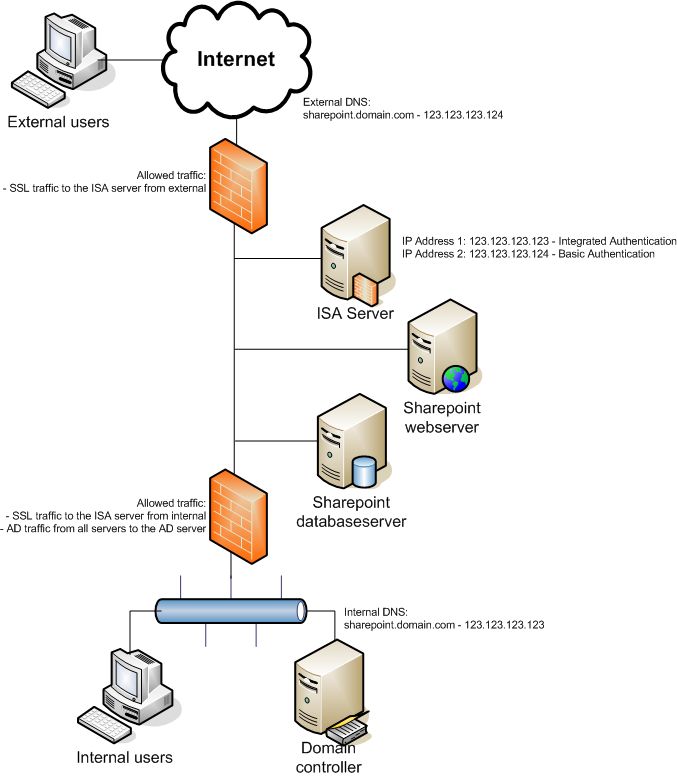 The final design we came to is:
- Configure two ip addresses on the ISA Server
- Configure two listeners and corresponding rules:
* the first listner/rule for the internal ip address and no authentication (IIS/Sharepoint will handle the authentication)
* the second listner/rule for the external ip address and basic authentication - Configure the Sharepoint web server on both integrated and basic authentication.
- Configure a split DNS situation. Externally the domainname sharepoint.domain.com points to the second ip address, internally to the first ip address.
Link 1: Users Repeatedly Prompted for Credentials
Link 2: Reverse Proxy Configurations for WSS and ISA Server
Monday, August 07, 2006
Sharepoint usage statistics
After returning from a well deserved (as I may say so :-) vacation in The United States I found an article on the Internet about Sharepoint Portal Server usage analysis.
Analysis by using the IIS logs does not work and the Usage Analysis UI is only provided in WSS. This aricle describe the why and how to work around these issues:
Your Top 10 List...Or How To Gather Usage Statistics with SharePoint
Analysis by using the IIS logs does not work and the Usage Analysis UI is only provided in WSS. This aricle describe the why and how to work around these issues:
Your Top 10 List...Or How To Gather Usage Statistics with SharePoint
Tuesday, July 11, 2006
Lots of Microsoft Office Sharepoint Server 2007 info!!
Here are some links to information about Microsoft Office Sharepoint Server 2007:
- Microsoft Office Preview
- Microsoft Office Beta Online
- IT Content for 2007 Office System Beta 2 (required for Office Beta pages) (AuthInstall.msi)
- Deploy Office SharePoint Server 2007 (Beta 2) on a single server
- Deploy Office SharePoint Server 2007 (Beta 2) in a server farm environment
- Using SQL Server 2005 for MOSS2007
- Installing a New Microsoft Office SharePoint Server 2007 Portal: Step-by-Step Instructions
- Deploy Language Packs in Office SharePoint Server 2007
- Introduction to Excel Services and Excel Web Access
- 2007 Microsoft Office Servers Beta Known Issues/ReadMe
- Microsoft Windows SharePoint Services (version 3) Beta Known Issues/ReadMe
- Site with lots of MOSS2007 links
Friday, June 30, 2006
Performance Issues Delay Office 2007
"by Stuart J. JohnstonJune 29, 2006"
Microsoft acknowledged Thursday that it has, at least slightly, delayed delivery of Office 2007, primarily for performance issues.
"Based on internal testing and Beta 2 feedback around product performance, we are revising our development schedule to deliver the 2007 Microsoft Office system by the end of year 2006, with broad general availability in early 2007," said a statement provided by a Microsoft spokeswoman.
Microsoft acknowledged Thursday that it has, at least slightly, delayed delivery of Office 2007, primarily for performance issues.
"Based on internal testing and Beta 2 feedback around product performance, we are revising our development schedule to deliver the 2007 Microsoft Office system by the end of year 2006, with broad general availability in early 2007," said a statement provided by a Microsoft spokeswoman.
Beta 2 of Office 2007 just started in late May when it was given out to attendees at Microsoft's annual Windows Hardware Engineering Conference in Seattle.
No one knows at this point, exactly how much extra time will be needed to assure the gigantic product is fully tested and optimized, and the company declined to speculate, saying, as always, that quality will determine schedules and not vice versa.
"Feedback on quality and performance will ultimately determine the exact dates," the statement said
Thursday, June 08, 2006
Sharepoint, databases and transaction logs
Recently I some servers of a customer experienced some SQL errors. The SQL transaction logs filled up really quickly, filling up the disk and causing Sharepoint to stop functioning. On the blog of Bill English I found a really usefull article about Sharepoint, databases, transaction logs and recovery models: SQL Databases, the LDF files and Sharepoint Portal Server backups
Subscribe to:
Comments (Atom)